 Official Site of The State of New Jersey
Employer Response Portal

NJ legislation, P.L. 2022 c. 120 (s2357), requires an employer to submit separation information within 7 days of a worker’s separation or 7 days from the date you received notice of a claim being filed. This includes those separated due to a lack of work.
You must be registered with Employer Access to use the new New Jersey Employer Response Portal.
To access the Out of State Employer Response Portal, click here.
A Client of a Professional Employer Organization (PEO) can submit separation information here.
Not yet registered with Employer Access? Start here.
You have to report an employee's separation to NJ Unemployment within 7 days of the date of separation. Do not wait for the employee to file a claim before you report the separation.
How to report a separation:
- Log in to the Employer Response Portal (use your myNJ login information connected to your Employer Access account).
- Select the employer that has the separated employee.
- Go to the Submit New Separation tab.
- Select if you have received a mailed notice and complete the prompts. (If you are using a mailed notice to respond, you will need information from that form to fill out the questionnaire.)
Click here to learn how to register with Employer Access.
Yes, you can resume incomplete forms started by anyone on behalf of the company you represent in the Employer Response Portal. Go to the Submission Status tab and select Incomplete in the list view. You can search or scroll to find the right record and click Continue.
If you do not have access to the new Employer Response Portal, you will not be able to resume an incomplete form and will have to start over using the original forms portal.
After you log in to the Employer Response Portal for the first time, you will start getting email reminders if you have not yet provided separation information once a claim has been filed. Go to the Submission Status tab and select “Missing Responses” from the list view to see all missing responses created for you. Missing responses expire 7 days from the date you were notified, so don’t delay!
If an employer fails to provide separation information within 7 days of separation or 7 days of receipt of notice, the determination will be made with available information. The employer will receive the determination and appeal rights in the mail. If the employer does not file an appeal within 7 days of receipt of the determination, then the determination becomes final.
If you are not registered in the state of New Jersey and do not have any employees working in New Jersey you will not be able to use the New Jersey Employer Response Portal. You will not be able to submit separation information until you received notice of a claim filed.
Once you receive notice of a claim filed use this portal to provide the required information.
You can still provide separation responses to mailed notices requesting details through the old portal.
Once a claim is filed, if the claimant has an email address on file with the Division, we will send a secure link that will take them to an online application which will be an electronic fact finding for any issues on the claim. Once the employer submits a separation response, that response will be shown to the claimant as part of their fact-finding statement.
If follow up or clarification is required by an examiner adjudicating this claim, you may be contacted via email or phone. If you are unavailable for the call or do not have all the information being requested, you will be given a 2-business day deadline to obtain the necessary information and respond.
If you had a layoff of multiple workers, you can use our convenient Mass Layoff toll to report these separations in one report, instead of having to complete individual responses for each worker (up to 1,000 can be reported in one submission).
- Report up to 1,000 layoffs within 7 days of the separation date, regardless of whether a NJ Unemployment claim has been filed.
- Employers can enter all layoff-related employee information on one spreadsheet, requiring only one upload once completed.
- Login to the Employer Response Portal
- Select the employer that is reporting a mass layoff.
- Go to the Mass Layoff tab.
- Download the template (the link will be available in the portal).
- Prepare and enter your data. For each separating employee, you'll need to provide:
- First and last name
- Email address (optional)
- Social security number
- Date of separation
- Last day of work
- Put an X for any payment received after the last day of work. This includes:
- PTO (paid time off)
- Payment in lieu of notice
- Retirement pay
- Severance pay
- WARN Act pay
- Continuation pay
- Upload file
- Login to the Employer Response Portal
- Go to the Mass Layoff tab
- From the dropdown menu, select Mass Layoff Responses
No, the Mass Layoff template is available only for layoff separations.
Enter the required information on the intake screen. You will be required to know the Name and FEIN of the PEO as well as provide your company name.
Once you start the form, you cannot save and return later. Make sure you have all the separation information when submitting the details or you will need to start over.
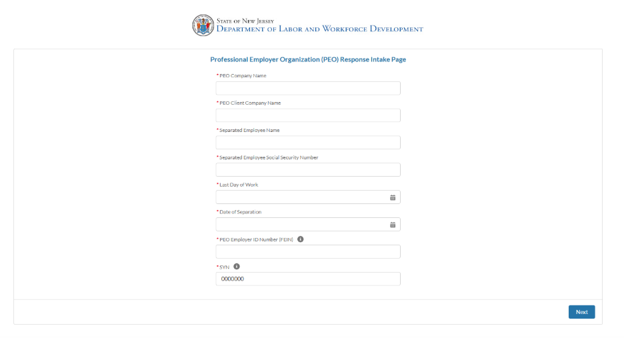
The PEO has to be registered with the Department of Labor as a Professional Employer Organization. If the PEO FEIN is not being accepted contact NJUI Employer Outreach for assistance.
- Log into the Employer Response Portal
- From your Employer Response Portal homepage, click the "Submission Status" tab
- From the dropdown menu, select "Missing Responses"
- Select the missing response you are responding to and click "View Details" to continue to the form
These requests are time sensitive, log in right away to avoid penalties.
- Log into the Employer Response Portal
- From your Employer Response Portal homepage, click the "Submission Status" tab
- From the dropdown menu, select "Incomplete Responses"
- Select the employee you are responding to and click "View Details" to continue to the form.
If you registered for the Employer Response Portal, you will receive email notification from Unemployment if a claim has been filed and the separation details are not received yet. If the UI SIDES information is received later, it will replace the missing record.